WiFi and Bluetooth Across Three Architecturally Distinct Machines


Border Cyber Group | May 2026

When you build a Linux distribution from scratch — no package manager, no upstream binary blobs, every dependency compiled from source in dependency order — the easy problems disappear. What remains are the ones that actually matter. This post is about one of the more instructive milestones in the SableLinux project: getting WiFi and Bluetooth working simultaneously on three fundamentally different machines, packaging that support into a live ISO that boots from USB and connects to the internet without any pre-configuration, and the specific failures encountered along the way that made the final result worth writing about.

Background: What SableLinux Is

SableLinux is a custom Linux distribution built on Linux From Scratch 12.4-systemd. It runs kernel 6.16.1, GCC 15.2.0, LLVM 19.1.7, Mesa 25.0.1, Sway 1.10 on Wayland, and a full penetration testing stack — Metasploit 6.4.122, radare2, Ghidra, pwndbg, tshark, ffuf, gobuster, and several dozen others — alongside a local AI inference stack running DeepSeek-R1 on ROCm 7.2.2 against an AMD RX 9070 XT. The target market is professional security researchers who want a platform they fully control and understand at every layer, backed by proprietary AI-assisted pentest tooling currently in development.

Live ISO distribution is a core requirement. The build must boot from USB on hardware it has never seen before and produce a usable desktop with internet connectivity. In early May 2026, the first successful live boot occurred on an HP Pavilion (Intel i3-8100, UHD 630) — wired ethernet only. That was the baseline. WiFi and Bluetooth came next, and the path there required two kernel rebuilds, firmware sourcing across three vendor trees, and a non-obvious fix to the live initramfs that took longer to isolate than anything else in the session.

The Hardware Matrix

Three machines drove the WiFi/BT work, each representing a distinct driver and firmware story:

Primary SableLinux build machine — Gigabyte Z890 Aorus Elite X ICE, Intel Core Ultra 5 245K (Meteor Lake), AMD RX 9070 XT. WiFi is provided by a MediaTek MT7925 — a modern WiFi 6E/7 combo chip embedded on the Z890 board, handling both wireless and Bluetooth through a single hardware block.

HP Pavilion (validation target 1) — Intel Core i3-8100 (Coffee Lake, 2018), Intel UHD 630, 16GB RAM. WiFi is a Realtek RTL8821CE PCIe card. This chip uses the rtw88 driver family, which was added to the mainline kernel significantly later than the chip's commercial lifetime and sits in a different driver subsystem entirely from the older rtl8xxxu path many Realtek cards use.

ASUS Q503UA "maya" (validation target 2) — Intel Core i5-6200U (Skylake, 2016), Intel HD Graphics 520. WiFi is an Intel Wireless-AC 7265 dual-band card using the iwlwifi driver with the iwlmvm firmware transport. The 7265 is a well-supported chip but requires its own MVM stack separate from the base iwlwifi module.

Three vendors. Three driver subsystems. Three distinct firmware packages. All need to work in both the installed system and the live ISO environment.

Kernel Rebuild #3: Getting the Modules Compiled

The first kernel build for SableLinux — compiled against the primary machine — had focused on the components needed for the installed system at the time: NVMe, DM-crypt, AMDGPU, i915, USB, and the core networking stack. WiFi support was deferred. The config had CONFIG_MT7925_COMMON=y and CONFIG_MT7925E=y set — correct chipset, but built-in rather than as modules. That became the first problem.

When a WiFi driver is compiled directly into the kernel (=y), the firmware load happens during early kernel initialization, before the firmware subsystem has necessarily located and mounted the firmware partition. On a live ISO this timing issue is terminal: the kernel initializes the MT7925 hardware, requests firmware from the firmware loader, gets nothing back because the squashfs hasn't been mounted yet, and the interface never comes up. Building the driver as a module (=m) defers initialization until after the system is fully booted and udev has processed device events, by which point the firmware is accessible. Changing both CONFIG_MT7925_COMMON and CONFIG_MT7925E from =y to =m resolved the timing failure on the primary machine.

The Realtek RTL8821CE and Intel 7265 MVM stack were simply absent. Four entries were added:

CONFIG_IWLMVM=m
CONFIG_RTW88=m
CONFIG_RTW88_CORE=m
CONFIG_RTW88_8821C=m
CONFIG_RTW88_8821CE=m

CONFIG_RTW88_8821CE is the PCIe glue layer for the RTL8821CE specifically; the underlying rtw88_8821c module provides the core chip support, but the CE suffix denotes the PCIe bus variant as distinct from the USB variant handled by rtw88_8821cu. Both are required.

The rebuild hit an unexpected obstacle during make syncconfig. The kernel build system detected that CONFIG_RUST was set in the config — a leftover from the 6.16.1 config file pulled during initial LFS build — and attempted to invoke rustc to satisfy Rust language support for in-tree Rust modules. The SableLinux system has Rust/cargo installed via rustup to /root/.cargo for building external tools, but the kernel's own Rust integration requires a specific bindgen version and a separately configured rustc that matches the kernel's expectations. The installed rustup configuration did not satisfy those requirements, and syncconfig failed.

The fix was to explicitly disable CONFIG_RUST in the .config and run make mrproper to clear the stale Rust-related build state accumulated from the previous kernel build. mrproper is more aggressive than make clean — it removes the .config itself along with generated headers — so the config had to be reapplied after the clean. After that the build proceeded cleanly. make -j14, modules install, bzImage to /boot.

Firmware: Three Sources, One Clone

Kernel modules without firmware are inert. Each of the three chipsets requires binary firmware blobs that are loaded at driver initialization time.

The linux-firmware repository maintained on kernel.org is the canonical upstream source for wireless firmware. A fresh clone pulled down the complete tree, which is several gigabytes covering hundreds of devices. The relevant paths:

MediaTek MT7925 (primary machine): mediatek/mt7925/WIFI_RAM_CODE_MT7925_1_1.bin, mediatek/mt7925/WIFI_MT7925_PATCH_MCU_1_1_hdr.bin, mediatek/mt7925/BT_RAM_CODE_MT7925_1_1_hdr.bin. The MT7925 is a combined WiFi/BT device — a single hardware block handles both radios, but they present as separate logical interfaces under Linux. The BT firmware file is distinct from the WiFi files and is required for hci0 to initialize.

Intel 7265 (ASUS Q503UA): intel/iwlwifi/iwlwifi-7265D-29.ucode. The iwlwifi driver searches for firmware files in descending numerical order from the highest known revision. The -29 file is the current version; symlinks were created from -22 through -28 pointing to the same binary to satisfy older driver revision requests that some kernel versions emit during probe. This is a standard pattern for Intel wireless firmware management.

Realtek RTL8821CE (HP Pavilion): rtw88/rtw8821c_fw.bin. The rtw88 driver uses a unified firmware file for the 8821C core regardless of bus type. The file lands in a flat directory under rtw88/ rather than a chip-specific subdirectory.

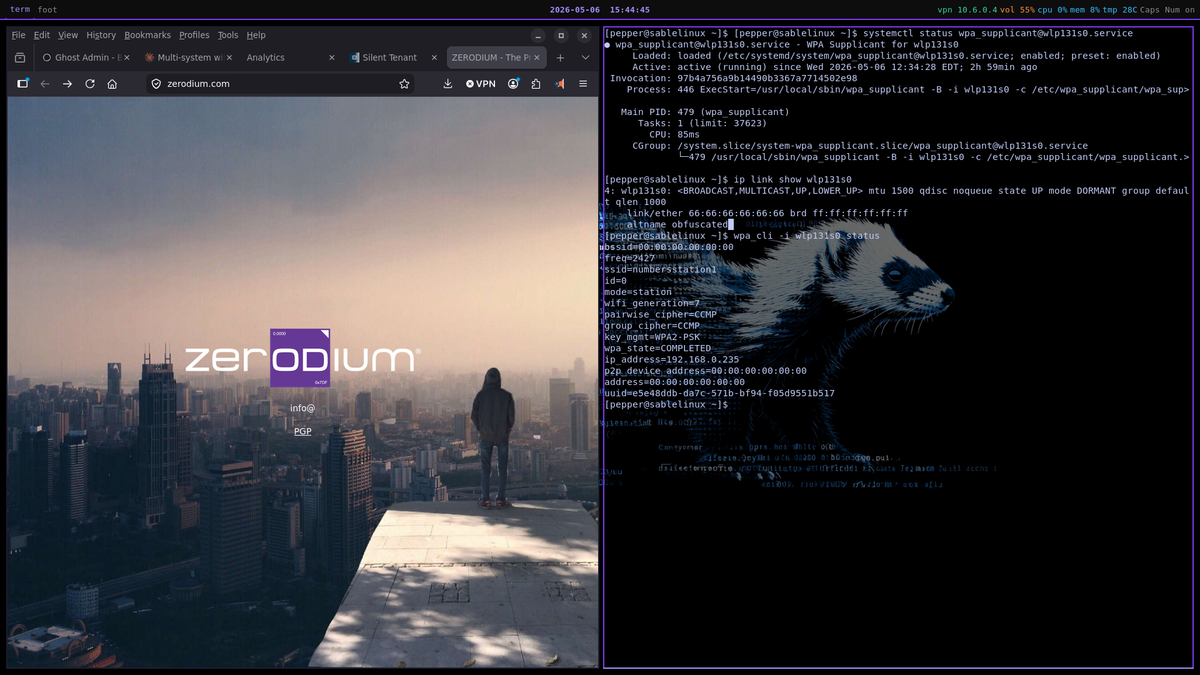
All firmware was installed to /lib/firmware/ on the main system. After reboot, wlp131s0 appeared on the primary machine — the MT7925 interface naming following predictable PCIe enumeration. WiFi IP 192.168.0.235 acquired via DHCP from the 25-wifi.network systemd-networkd unit.

wpa_supplicant 2.11: Built From Source

SableLinux has no package manager and no pre-built binaries. wpa_supplicant was built from source — version 2.11, the current stable release — installed to /usr/local/sbin. The build process on an LFS system requires manually constructing .config from the template provided in the source tree. The critical entries for WPA2-PSK on a 5GHz network: CONFIG_DRIVER_NL80211=y, CONFIG_WPA_SUPPLICANT=y, CONFIG_WPS=y, and the nl80211 netlink library linkage against the system's libnl installation.

The primary machine's wpa_supplicant.conf was configured for WPA2-PSK on the 5GHz band. A systemd service unit wpa_supplicant@wlp131s0.service was created and enabled, providing automatic association at boot. The 25-wifi.network networkd unit sets RouteMetric=2048 for the WiFi interface, leaving the wired interface at metric 1024 — wired connectivity takes priority whenever both are present.

A WireGuard Routing Bug Surfaces

With WiFi operational on the primary machine, a secondary failure emerged: WireGuard stopped functioning correctly when the wired connection was absent. The wg0.conf PostUp and PreDown hooks had hardcoded enp132s0 as the outbound interface for the iptables rules managing VPN traffic. When the machine was wireless-only, those rules referenced a non-existent interface and the tunnel failed to route.

The fix replaced the hardcoded interface name with dynamic detection: ip route get 1.1.1.1 | grep -oP 'dev \K\S+' determines the current default-route interface at tunnel activation time, and the PostUp/PreDown rules are constructed around that result. WireGuard now establishes and routes correctly whether the path is wired, wireless, or transitions between them.

This is a pattern worth noting: interface names derived from PCIe enumeration are predictable for a given machine but not portable. Any configuration that hardcodes them will fail when the hardware context changes.

Kernel Rebuild #4: Bluetooth Stack

Bluetooth required a second kernel rebuild because the Bluetooth subsystem was entirely absent from the existing config. The additions:

CONFIG_BT=m
CONFIG_BT_RFCOMM=m
CONFIG_BT_BNEP=m
CONFIG_BT_HIDP=m
CONFIG_BT_HCIBTUSB=m
CONFIG_BT_MTK=m
CONFIG_BT_INTEL=m
CONFIG_BT_BCM=m
CONFIG_BT_RTL=m

CONFIG_BT is the core Bluetooth subsystem. The transport-specific entries — CONFIG_BT_MTK, CONFIG_BT_INTEL, CONFIG_BT_BCM, CONFIG_BT_RTL — are vendor extensions loaded on top of CONFIG_BT_HCIBTUSB that handle device-specific initialization sequences and firmware loading for each vendor's HCI implementation. The MT7925's Bluetooth presents as a USB HCI device even though it's a PCIe combo chip; BT_MTK provides the vendor initialization on top of the btusb transport layer, and BT_RAM_CODE_MT7925_1_1_hdr.bin is loaded during that initialization.

After this rebuild and a system reboot, hci0 appeared on the primary machine. Bluetooth is operational.

Live ISO Integration: The Hard Part

Getting WiFi working on the installed system is straightforward compared to making it work in a live environment. The live boot chain has specific constraints: the squashfs is read-only, the overlay is ephemeral, firmware must be present in the initramfs or on the mounted USB partition before drivers initialize, and modules that rely on udev rules need those rules present in the live rootfs.

The following changes were made to the liveroot and the initramfs build:

Firmware in initramfs: The initramfs build for SableLinux populates from /opt/initramfs-tools/, which holds the busybox binary, switch_root, and the minimal libc needed for the init script. The firmware blobs for all three chipsets were added to /opt/initramfs-tools/lib/firmware/ — the full paths under mediatek/mt7925/, intel/iwlwifi/, and rtw88/. The initramfs rebuild packages these into the cpio archive that the kernel unpacks at boot, making firmware available before the squashfs is mounted. For live environments this is the correct approach; relying on firmware from the mounted USB partition introduces ordering dependencies that are difficult to guarantee across different hardware boot speeds.

Module autoload: /etc/modules-load.d/wifi.conf was added to the liveroot with two entries: iwlmvm and rtw88_8821ce. This ensures both drivers are loaded at boot for targets that carry those chipsets. The MT7925 modules load automatically via udev on the primary machine and the live environment.

wpa_supplicant binaries in liveroot: The compiled wpa_supplicant and wpa_cli binaries were copied into the liveroot alongside the system's installed copies. The live user sable does not have a pre-configured wpa_supplicant.conf — the live environment is inherently site-agnostic and cannot know the target network credentials in advance.

wifi-connect script: A small interactive helper at /usr/local/bin/wifi-connect was written for the live session. It takes an interface name, SSID, and passphrase as arguments, generates a minimal wpa_supplicant.conf in /tmp, launches wpa_supplicant against it, and triggers a DHCP request via systemd-networkd. On machines where the driver loads automatically — the Q503UA requires an additional modprobe iwlmvm first — wifi-connect brings up the interface within seconds.

Results Across Three Systems

Primary machine (Z890/MT7925): wlp131s0 comes up automatically at boot. IP acquired via DHCP at 192.168.0.235. WireGuard tunnel establishes over WiFi with correct routing. Bluetooth hci0 active. No manual intervention required after initial configuration.

HP Pavilion (RTL8821CE): The rtw88_8821ce module loads from the modules-load.d entry. Firmware is present in the initramfs. wifi-connect used to associate with the target network during the live session. Internet access confirmed. This machine became the primary live ISO validation target because its Intel UHD 630 GPU requires the iris Gallium driver in Mesa — it tests both the graphics stack and the WiFi stack simultaneously.

ASUS Q503UA "maya" (Intel 7265D): modprobe iwlmvm required before attempting association — this is a known gap in the autoload configuration, where the base iwlwifi module loads but does not automatically pull in the MVM transport layer on this particular hardware. wifi-connect then brings up the interface and acquires an IP. Internet access confirmed. The fix for automatic load on target hardware is adding iwlwifi to the modules-load.d entry, which triggers the MVM dependency chain via modprobe dependency resolution; this is noted for the next ISO rebuild.

What This Demonstrates

A live bootable operating system that provides a working Wayland desktop with WiFi connectivity on a 2015 Realtek card, a 2016 Intel 7265, and a 2024 MediaTek MT7925 — all from the same USB image, all from a distribution built entirely from source — is a meaningful validation of the SableLinux architecture. It means the driver coverage model works, the firmware packaging strategy works, and the live boot chain is robust enough to handle hardware variation.

The more instructive outcome is the process that got there. The =y versus =m distinction for firmware-dependent drivers is a genuine live ISO gotcha that catches projects that only test on installed systems. The Rust syncconfig failure required understanding the difference between make clean and make mrproper. The WireGuard interface hardcoding bug was invisible until the secondary connectivity path was tested. Each failure was specific, diagnosable, and fixed with a targeted intervention rather than brute-force iteration.

The next steps are resolving the iwlmvm autoload gap for the Q503UA, integrating Bluetooth into the live session (currently functional on the installed system only), and working toward a signed EFI binary and Secure Boot enrollment pipeline for release candidates. The live ISO is no longer a prototype. It boots, it connects, and it works.


Jonathan Brown (A.A.Sc., B.Sc) writes about cybersecurity infrastructure, privacy systems, the politics of AI development and many other topics at bordercybergroup.com and aetheriumarcana.org. Border Cyber Group maintains a cybersecurity resource portal at borderelliptic.com . He works from a custom-built Linux platform (SableLinux) which is currently under development and fully documented at https://github.com/black-vajra/sablelinux.

If you would like to support our work, providing useful, well researched and detailed evaluations of current cybersecurity topics at no cost, feel free to buy us a coffee! https://bordercybergroup.com/#/portal/support