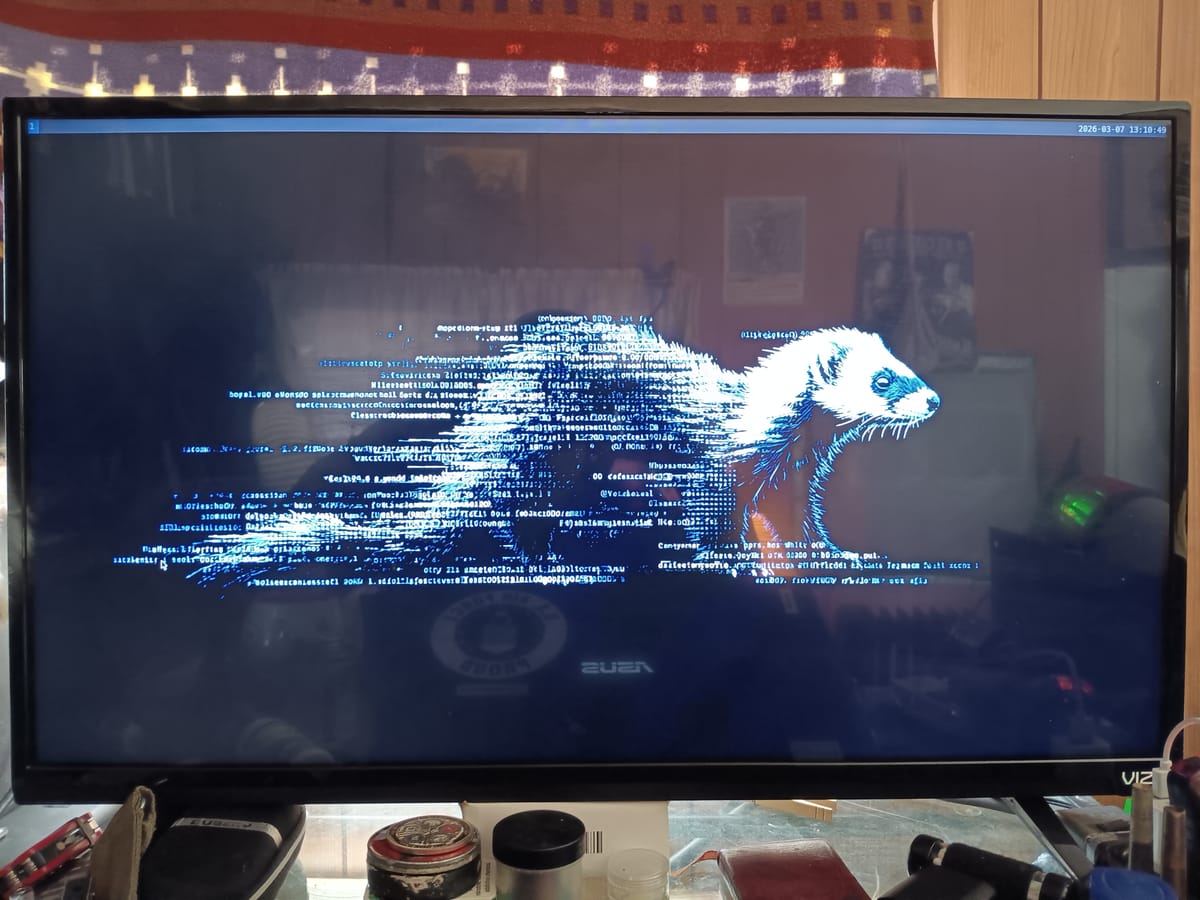
When we closed the LFS phase of SableLinux, we had something genuinely rare: a fully operational custom Linux distribution built entirely from source, booting independently from a USB SSD, driving output through both an Intel Arc iGPU and an AMD RDNA4 discrete card, with systemd 257 running cleanly and 1Gbps network confirmed. No package manager. No graphical environment. No user-facing software of any kind beyond what LFS provides. A foundation, not a system.
The Beyond Linux From Scratch phase is where that foundation becomes a platform. It's also where the nature of the work changes in ways that aren't obvious until you're in it.
LFS is linear. Eighty-six packages, a prescribed order, a well-defined end state. You follow the sequence, you get the result. BLFS is a graph — and not a tidy one. Every package you want pulls a chain of dependencies, and those dependencies pull their own, and some of those are optional-but-recommended in ways that will bite you later if you skip them. The first few major BLFS packages feel less like following a recipe and more like navigating a city without a map.
Here's what we built, what broke, and how we fixed it. If you're attempting something similar on a modern LFS base, this is the post I wish had existed.
Making the System Livable
The Bootstrap Problem
The first thing to understand about working on a minimal LFS system is that you have no privilege escalation. Everything runs as root. That's fine during the LFS build itself — you're in a controlled chroot, the risks are bounded, and the convenience is real. But once you're booting natively into the system and doing active development work, root-only operation is friction that compounds across every task. One mistyped path, one stray wildcard, and you've potentially modified something that matters.
The first BLFS package on the list was sudo 1.9.16p2 — but it didn't go entirely smoothly.
The initial download target was 1.9.15p5, which is what the BLFS 12.4 book references. The build failed during compilation with GCC pointer type compatibility errors — the kind of error that's become increasingly common as GCC defaults have tightened up in recent versions. The fix was upgrading to 1.9.16p2, where the relevant issues had been addressed upstream. If you're building on a system with a recent GCC (14+), expect to hit this. Upgrade the source rather than fighting the compiler flags.
With sudo built and installed, configuring it for the wheel group is a single sed invocation:
sed -i '/%wheel ALL=(ALL:ALL) ALL/s/^# //' /etc/sudoers
Verify with sudo whoami — it should return root while you remain the unprivileged user. The output is correct and slightly disorienting the first time you see it.
The Login Shell Initialization Trap
One small thing caught us early: logging into SableLinux as a non-root user and finding that .bashrc didn't load. The reason is standard bash behavior: login shells read .bash_profile, not .bashrc directly. If .bash_profile doesn't exist or doesn't explicitly source .bashrc, your entire environment setup silently doesn't run. Add this early and it won't surprise you again:
echo '[[ -f ~/.bashrc ]] && source ~/.bashrc' >> ~/.bash_profile
OpenSSH and the Workflow Transformation
OpenSSH 9.6p1 was the second package, and its impact on the development workflow was immediate and disproportionate to its build complexity. Up to this point, working natively on SableLinux meant being physically at the machine for every session. With OpenSSH installed and sshd enabled as a systemd service, that constraint lifted entirely. The development machine became a remote build server accessible from the laptop over the local network.
One configuration recommendation BLFS doesn't emphasize: create /etc/ssh/sshd_config.d/ and put local overrides there rather than editing the main config file directly. It keeps the configuration cleaner and makes it easier to reason about what you've changed from defaults.
wget, curl, and Certificate Infrastructure
The certificate setup deserves more attention than it usually gets. On a distribution system, certificate trust is handled for you. On a from-scratch LFS base, you build that trust from nothing. The BLFS make-ca script handles the mechanical work — it fetches Mozilla's root certificate bundle, processes it into the format that OpenSSL and GnuTLS expect, and installs it to the standard system trust paths.
Skip this step or do it wrong and every HTTPS download will fail with certificate verification errors. Get it right once and it's invisible forever.
With wget, curl, git, and certificate infrastructure in place, the build workflow fully opened up. Fetching source tarballs directly on SableLinux — no host-side transfers required.
The Display Stack
This is where BLFS earns its reputation. Building a modern Wayland display stack from source on a minimal LFS base is the most complex dependency graph we've encountered in the entire SableLinux project so far. Not because any individual package is especially difficult, but because the chain is long, the ordering constraints are strict, and the failure modes are subtle.
Our target: Sway as the Wayland compositor, with Mesa 25.0.1 providing GPU acceleration for both the AMD RDNA4 discrete card and the Intel Arc iGPU. Here's the full build sequence, in order, and what went wrong at each step that went wrong.
The Dependency Chain
Before a single line of Wayland code compiled, we built the following foundational libraries in sequence:
libxml2 2.13.5
Required by several later packages for XML parsing. Straightforward build, no surprises. Configure with --with-history disabled unless you specifically need it — it adds a readline dependency.
glslang 16.2.0
The GLSL shader compiler, required by Mesa for shader validation. This is a cmake build, and it introduced the first encounter with the lib64 problem (covered in depth shortly). The correct cmake invocation requires -DCMAKE_INSTALL_LIBDIR=lib explicitly:
cmake -B build -DCMAKE_INSTALL_PREFIX=/usr -DCMAKE_INSTALL_LIBDIR=lib
-DCMAKE_BUILD_TYPE=Release
-DBUILD_SHARED_LIBS=ON
cmake --build build -j14
sudo cmake --install build
wayland 1.23.1 and wayland-protocols 1.44
The core protocol libraries. These are meson builds and configure cleanly on a proper LFS base. No deviations from BLFS instructions required.
libevdev 1.13.3 → mtdev 1.1.7 → libinput 1.31.0
The input handling stack, in that exact order. libevdev provides kernel event device abstraction; mtdev handles multitouch protocol translation; libinput sits on top of both. Build them in sequence and don't skip mtdev even if it looks optional — libinput needs it for multitouch and some configurations won't even finish ./configure without it.
seatd 0.9.1
Seat management daemon, required for non-root Wayland compositor operation. This is the piece that allows Sway to access GPU and input devices without running as root. After installation, add the user to the seat group:
sudo usermod -aG seat pepper
Without seat group membership, sway will launch and immediately crash with a permissions error on the DRM device. The error message is not obvious about the cause.
hwdata 0.392 and libdisplay-info 0.3.0
Hardware ID database and EDID/DisplayID parsing library. Both clean builds, both required by wlroots.
Mesa 25.0.1: The Centerpiece
Mesa is where the build gets serious. It sits at the intersection of more dependency chains than anything else in the display stack, and the meson configuration options require careful thought.
LLVM First
Mesa requires LLVM, and the version matters significantly. RDNA4 (gfx1201) requires LLVM 18 minimum; LLVM 19 is preferred and what we targeted. LLVM is one of the largest packages in the entire dependency graph — plan for a full hour even on 14 cores. Required components: X86 and AMDGPU backends, clang, and lld. Suppress everything else.
Mesa Configuration
Key decisions for SableLinux: radeonsi for AMD, llvmpipe as software fallback, RADV Vulkan for AMD. Intel's iris driver and ANV Vulkan were deferred pending libclc — we built Mesa first without them and planned an add-on pass. The meson invocation:
mkdir build && cd build
meson setup ..
--prefix=/usr
--buildtype=release
-D platforms=wayland
-D gallium-drivers=radeonsi,llvmpipe
-D vulkan-drivers=amd
-D glx=disabled
-D egl=enabled
-D gles1=disabled
-D gles2=enabled
-D llvm=enabled
-D shared-llvm=enabled
-D valgrind=disabled
-D video-codecs=h264dec,h264enc,h265dec,h265enc
ninja -j14
sudo ninja install
If you're planning to add X11 support later, include platforms=x11,wayland from the start. Retrofitting a Mesa build is a full rebuild.
wlroots 0.18.2: The Patch That Was Required
wlroots is the compositor library Sway builds on. Version 0.18.2 introduced an API compatibility break with libinput 1.31. Specifically: wlroots references LIBINPUT_SWITCH_KEYPAD_SLIDE, an enum value added to libinput in a version later than 1.31. The build fails with an undeclared identifier error.
The fix is a small source patch removing or ifdef-guarding the offending case in wlroots/backend/libinput/switch.c before running meson. This is the class of failure BLFS documentation doesn't cover — version skew between two packages that are both nominally current. When you hit unexplained build failures, check whether your dependency version is older than what the package was actually tested against.
The lib64 Problem — A Systemic Issue
json-c 0.18 is a small JSON parsing library required by Sway. It's a cmake build, and it installed to /usr/lib64 instead of /usr/lib.
SableLinux uses a merged-usr layout where /lib is a symlink to usr/lib, and /usr/lib is the canonical library directory. There is no meaningful /usr/lib64 — it's an RPM-distribution artifact. When json-c installed there, pkg-config couldn't find it, and Sway's dependency check produced a library-not-found error with no clear indication of the actual cause.
The cmake flag that prevents this: -DCMAKE_INSTALL_LIBDIR=lib. We had applied it to glslang. We missed it on json-c.
Rule for LFS/BLFS builders on merged-usr systems: every cmake package needs -DCMAKE_INSTALL_LIBDIR=lib or you will chase library path issues for the rest of the build.
The manual repair, for reference:
sudo cp /usr/lib64/libjson-c.so.5.4.0 /usr/lib/
sudo ln -sf libjson-c.so.5.4.0 /usr/lib/libjson-c.so.5
sudo ln -sf libjson-c.so.5 /usr/lib/libjson-c.so
sudo cp /usr/lib64/pkgconfig/json-c.pc /usr/lib/pkgconfig/
sudo sed -i 's|/usr/lib64|/usr/lib|g' /usr/lib/pkgconfig/json-c.pc
sudo ldconfig
ldconfig -p | grep json-c # verify /usr/lib appears
Sway 1.10: The Compositor
With the full dependency chain in place, Sway 1.10 builds cleanly:
mkdir build && cd build
meson setup ..
--prefix=/usr
--buildtype=release
-D sd-bus-provider=libsystemd
-D werror=false
-D man-pages=disabled
ninja -j14
sudo ninja install
-D werror=false is worth understanding. Sway enables -Werror by default, turning any compiler warning into a fatal build error. On a system with a slightly different GCC than Sway's CI environment, you'll hit warnings that weren't present during upstream testing. Disabling werror is not hiding real problems — it's acknowledging compiler warning thresholds vary across versions.
-D man-pages=disabled avoids a scdoc dependency that isn't in the BLFS book and isn't worth the detour.
swaybg and Foot: Finishing Touches
swaybg 1.2.1 provides wallpaper support. Configure in ~/.config/sway/config:
output * bg /path/to/wallpaper.png fill
Foot is the terminal emulator — fast, Wayland-native, no exotic dependencies. For a dark aesthetic with wallpaper transparency:
[main]
font=DejaVu Sans Mono:size=11
[colors]
alpha=0.85
background=1a1a2e
foreground=c0caf5
The alpha value controls transparency — the wallpaper shows through, composited behind the terminal's color tint. Small detail, but it's what makes the desktop feel intentional rather than assembled.
The First Boot Into a Working Desktop
The moment Sway launched for the first time on SableLinux — wallpaper rendering, foot terminal opening on Super+Return, swaybar showing the date — was a different kind of milestone than the first boot at the end of LFS.
The LFS first boot was proof of concept. This was proof of capability. The gap between a login prompt and a working Wayland compositor represents hundreds of packages, a complex dependency graph, and a significant number of hours debugging library path issues and API skew between adjacent package versions.
There's a specific quality to a custom desktop assembled from source, where you know every component, understand why it's there, and made a deliberate choice about each configuration option. There are no mystery processes in the process list. No packages installed "just in case." The system does exactly what you built it to do and nothing it doesn't.
What's Next
AI/LLM Stack
The next primary deliverable. SableLinux is explicitly designed as a local inference platform: Python, the scientific computing stack, and ROCm for AMD GPU compute acceleration. ROCm on a from-scratch system is genuinely complex — it was developed for distribution-packaged environments and adapting it to a hand-built LFS base requires understanding its internals at a level that apt install rocm-dev never demands. The reward: quantized 7B–13B parameter models running on the RDNA4 card with minimal OS overhead.
The gfx1201 Firmware Gap
The gc_12 series firmware blobs required for RDNA4 compute weren't present in Ubuntu 24.04's linux-firmware package. A 2025 linux-firmware snapshot from kernel.org has them. One critical note for LFS builds: SableLinux's kernel doesn't have zstd firmware decompression compiled in. Decompress on the host before copying:
# On the host (Ubuntu), for each .bin.zst file:
zstd -d gfx1201_me.bin.zst
sudo cp gfx1201_*.bin /lib/firmware/amdgpu/
Security and Penetration Testing Stack
nmap, Wireshark, and the broader network analysis toolchain are the next priority on this front. The Metasploit stack follows — heavier build, significant Ruby dependency chain, but a primary target for SableLinux's identity as a security research platform.
Gaming and Virtualization
With Vulkan drivers in Mesa and the compositor running, gaming infrastructure (Wine, Steam, controller support) layers on top. QEMU/KVM and libvirt provide the virtualization layer for isolated security research environments.
What BLFS Teaches You That LFS Doesn't
LFS teaches you the structure of a Linux system. BLFS teaches you the ecosystem — how the pieces relate to each other, why the dependency graph is shaped the way it is, and what happens when two packages that are both nominally "current" make incompatible assumptions about a shared interface.
By the time you've built a working Wayland stack from source, you understand things that are genuinely hard to learn any other way: why pkg-config exists and what happens when a library installs to the wrong path; why cmake's INSTALL_LIBDIR variable matters on a merged-usr system; why API skew between adjacent package versions causes failures that look nothing like version incompatibilities; why the wayland protocol library and the wayland compositor library are different things with separate build dependencies.
More practically: you understand your system well enough to fix it when it breaks. Not by searching for your exact error message, but by reasoning about what the build system is trying to do, what it can't find, and where that thing should be. That skill doesn't come from apt install sway. It comes from having traced every dependency by hand.
SableLinux is heading toward a distributable release — an installer, a release process, documentation sufficient for technically capable users to deploy and build on it. The work being done now, package by package on a USB SSD, is the work that makes that possible. You can't distribute a system you don't fully understand. We're building the understanding first.
The display stack is working. The build continues.
SableLinux is developed openly at github.com/black-vajra/sablelinux (branch: development)
Follow the project at bordercybergroup.com
Member discussion: